
How do I start a shift in this Playrooms beginner guide?
On a Playroom computer, launch light.exe. Work lights come on and the shift begins.

Playrooms beginner guide: light.exe, bank balls, buy a flashlight, then the Waiting Area key. Steam 5037510. Get back before lights-out. Verified November 2026.
light.exe, first pit, shop.exe, flashlight, then the €10 key.
~9 min read
This Playrooms beginner guide is the first shift on Steam App 5037510 by Two Pixels UG. Collect the balls. Bring them back. Fill the ball pits. Banked balls are in-game currency. Full pits unlock abilities. Area keys open new rooms. When the shift ends, lights go out one by one — stay in the light. Play on Steam. Verified November 12, 2026.
This is Steam Playrooms, not Winterblood PLAYROOMS (App 3492480), adult playrooms, or PS4 The Playroom. There are no redeem codes. Community prices below are 1.0.0 Unverified unless the Steam store page says otherwise.
| Fact | Detail |
|---|---|
| Platform | PC via Steam |
| App ID | 5037510 |
| Developer | Two Pixels UG |
| Genre | Casual · Indie · Simulation |
| Mode | Single-player |
| Store price | $6.99 (store snapshot November 12, 2026) |
| Reviews | Overwhelmingly Positive · 97% of 1,107 reviews (store snapshot November 12, 2026) |
| Combat | None — collect, bank, buy, return before dark |
| Demo | Separate Steam demo App 5246850 |
Matched by build plan, shared topics, and guide progression — not random related links.
Day one is a computer, a pit, and a door — not a combat tutorial. Load App 5037510. Find the Playroom computers in the starting safe area. The mail and the in-computer helper both point at light.exe: launching it turns the work lights on and starts the shift clock. Your duty, in the in-game wording, is storing balls in collection basins and returning to the workstation when rest begins.
Walk this order once and the rest of this Playrooms beginner guide is only numbers and doors.
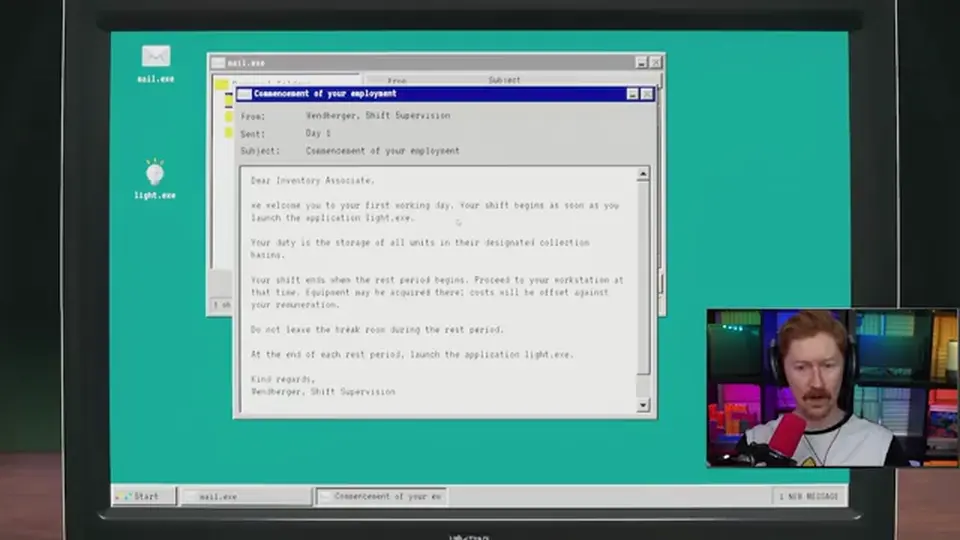
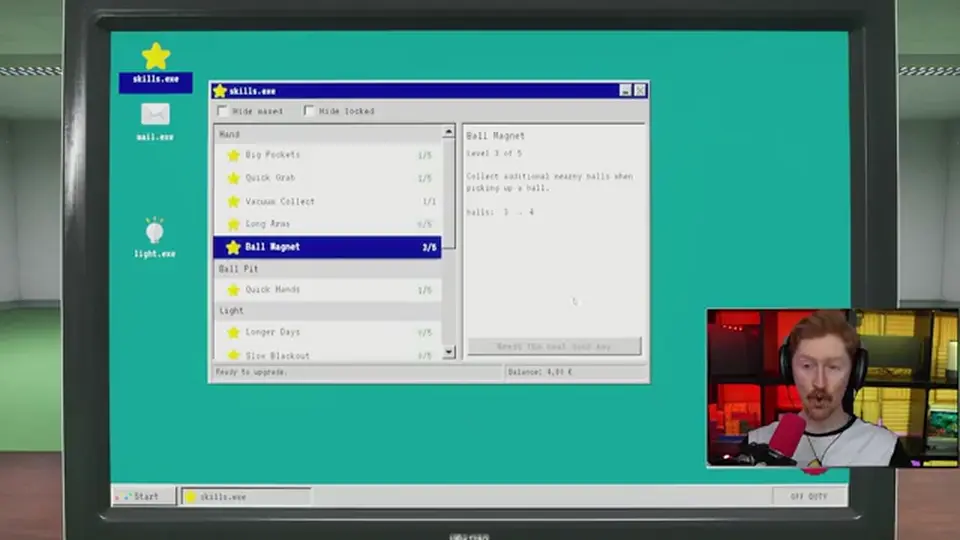
Community recaps name light.exe (start shift / work lights), shop.exe (tools and robots), skills.exe (Hand, Legs, Light, Ball Pit upgrades), stats.exe (region balls, pits, sparrows, decorations), and locker.exe (Ballie skins). Sparrow and decoration counters on stats.exe stay hidden until you pick up at least one of each type (community, Unverified).
It refuses a full upgrade plan, a 100% sparrow route, and Hardcore. Those pages exist later. First shift only proves you can bank currency and open one door. Next: why the lights matter more than the broom.
Steam: “When your shift is over, the lights start to go out one by one.” Stay in the light. The computer helper repeats the same rule: in the light everything is fine; when it goes out, come straight back. Rest-period mail tells you not to leave the break room, then to launch light.exe again when rest ends.
The Steam store does not print Cozy / Normal / Hardcore names in that paragraph. Community: Cozy does not kill you; Normal can cost the day; Hardcore death wipes the save. Lights-out is one of the Hardcore kill conditions, alongside school running, the office follower, and the hotel fall. Treat mode names as Unverified until you read them on your difficulty prompt.
| Beat | Source | First-shift move |
|---|---|---|
| Launch light.exe | In-game mail / helper | Starts lights and the work clock |
| Collect and bank | Steam store | Balls in pits become currency and pit progress |
| Lights go out one by one | Steam store | Walk toward remaining light, then the Playroom |
| Do not leave during rest | In-game mail | Stay in the break / safe area |
| Relaunch light.exe | In-game mail | Starts the next shift |
Community: flashlight unlocks in shop.exe after pit 1, body price €5, with Battery Life, Beam Brightness, Beam Range, and Fast Charge as upgrade fields (Unverified). Buy it before you start taking long walks into Waiting Area or Backrooms. A dead beam in a black corridor is a Hardcore wipe, not a flavor beat.
skills.exe Light upgrades include Longer Days and Slow Blackout (community totals ~€41.80 for the Light tree, Unverified). Do not budget those until you can already bank the €10 key and walk home. Next: how balls become euros.
Steam: more than 200,000 balls are scattered. You bring them back. Filling pits unlocks abilities. Collected balls are currency for the next area key and for equipment (store examples: scoop and flashlight). Community 1.0.0 adds a rate: €0.01 per banked ball. That rate is Unverified. In-game € is not the Steam $6.99 listing price.
The first key is Waiting Area €10, Playroom hall right, 2nd door. You do not need to empty the 5,000-ball Playroom count, and you do not need pit 1 filled, to buy it. Keys and pits are separate spends.
| Spend | Community 1.0.0 | Must I do it first? |
|---|---|---|
| Bank balls into any pit | €0.01 each (Unverified) | Yes — this is how you get € |
| Pit 1 to 1,500 | Unlocks Sprint | No — recommended, not required |
| Flashlight | €5 after pit 1 | Strongly yes before dark walks |
| Waiting Area key | €10 · right 2nd door | Yes — first new room |
| Push broom | €15 after first area key | Optional on shift one |
Community pit 1 is 1,500 balls for Sprint. A recorded first-shift fill shows Sprint unlocking on the HUD, then shop.exe mail, then a flashlight listing. Sprint is also a later Hardcore risk in School hallways — do not sprint in those corridors. Stairs are excluded from the no-run rule; details live on school stairs.
From the Playroom the community door list is: right 2nd Waiting Area €10, right 1st Backrooms €25, left 1st Poolroom €50, left 2nd School €60, right 3rd Office €90, left 3rd Hotel €100. Full rows, ball counts, and rules: rooms. Next: what shop.exe actually sells on day one.
shop.exe opens as an equipment catalog once the game grants it — a recorded shift shows the mail right after the first pit fill. Work equipment is offset against pay. Lost or damaged gear is not replaced (in-game mail). Community: Cozy, Normal, and Hardcore share the same tool prices.
First-shift buy order is flashlight, then the €10 key, then ignore the rest until you can walk a second room and still make it home.
| Item | Community price / unlock | First-shift? |
|---|---|---|
| Flashlight | €5 · after pit 1 | Buy |
| Waiting Area key | €10 · door board | Buy |
| Push broom | €15 · after first area key | If cash is left |
| Charging station | €10 / €15 / €22.50 | No — robots come later |
| Robot vacuum 1 | €8 · after a charging station | No |
| Ball vacuum 1 | €20 | After you have a route |
| Hand vacuum | €50 · after School key | Not shift one |
| Inventory scanner | €10 · after pit 4 | Not shift one |
The 1.0 patch added dual-wield: you can carry two tools at once. That is not a day-one puzzle. Carry flashlight plus whatever dump tool you bought. Whiteboard tools (brush, eraser, shapes, undo/redo) are for notes to the next employee, not currency.
Community Hand upgrades (Big Pockets, Quick Grab, Vacuum Collect, Long Arms, Ball Magnet) start around €0.40–€0.80 per first rank and the author totaled 21 ranks at €59.60. Useful, Unverified, and not the €10 door. Full catalogs sit on equipment. Next: the walk home.
Go back when lights start dying, when rest mail fires, or when your pockets are full — whichever is first. The Playroom is the safe computer hub. New rooms are longer walks. Waiting Area already has a hidden left-corridor maze (whale / green office); do not enter it on shift one.
If you die on Hardcore you lose the save. If you get caught in School on Normal, third-party flow says you can lose the day. First shift should never be a School run. Use this as the go-home list, then open the walkthrough for key two.
| Mistake | Fix |
|---|---|
| Launching the wrong Steam Playrooms | App 5037510, Two Pixels UG |
| Leaving the Playroom before light.exe | Lights on first, then collect |
| Treating floor balls as banked | Only pit deposits count as € and pit fill |
| Buying Hotel before a flashlight | €100 key is late-game; light is €5 |
| Emptying Playroom before €10 | Community: keys do not require a clear |
| Filling pits 1–8 in order on day one | Community: pit order is optional |
| Sprinting in School later | Hallways forbid it — school |
| Staying out through lights-out | Walk toward remaining light, then the Playroom |
| Trusting 199,000 as the pit total | Show both figures on walkthrough |
Pit 1 Sprint is the first mobility unlock. Do not spend that stamina in a School hallway that forbids running.
Waiting Area is 10,000 community balls, two sparrows, two decorations, and the maze door. Backrooms is the €25 right-1st door. That sequence is the walkthrough, not this page.
Next: buy keys in order on the Playrooms walkthrough, then read the rooms table before School. Flashlight and vacuums: tools.
On a Playroom computer, launch light.exe. Work lights come on and the shift begins.
Playroom / safe-area computers, same desk as light.exe, skills.exe, stats.exe, and locker.exe.
Community recaps say no. You can buy the next key without clearing the current room, and you can fill pits out of order.
Community 1.0.0: €10, Playroom hall, right, 2nd door. Unverified. In-game €, not Steam USD.
Community: shop.exe after ball pit 1, body €5. Unverified.
Yes — Steam demo App 5246850. Full 1.0 added rooms, dark threats, dual-wield, whiteboard, and achievements that the demo did not have.
Steam lists Single-player. Family Sharing and Steam Cloud are on. There is no official Discord listed on the store.
No. This is a Steam single-player title, not a Roblox codes game.
The walkthrough for six keys and Clock out, then rooms.
November 12, 2026
Matched by build plan, shared topics, and guide progression — not random related links.